
T-Pay Payment via API
The payment service Роутер supports T-Pay payment through API. Until this payment method is supported by other acquiring banks, T-Pay payment is only available at T-Bank.
The bank for T-Pay must be set in the partner's settings in the Payment Service. To set it, contact support. To find out the current settings, use the /settings/getRouterParams.do request.
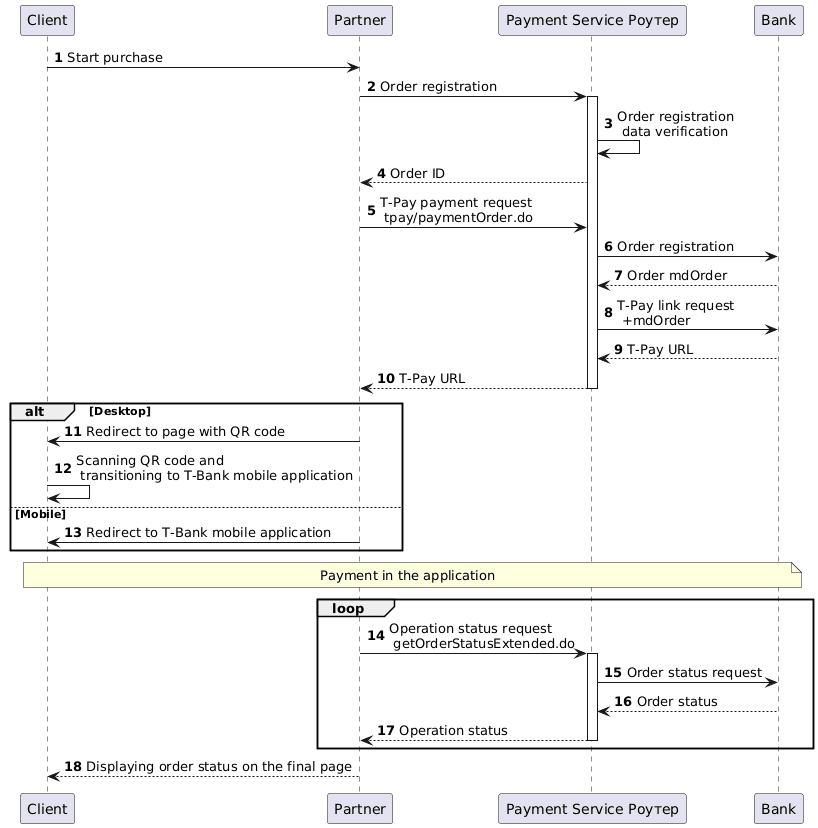
Integration Scheme
Order Registration
1. The client initiates the purchase of goods or services on the Partner's website.
2. The Partner sends a request to the Payment Service Роутер to register an order: register.do for single-stage payments or registerPreAuth.do for two-stage payments. For more details on these types of payments, see Two-Stage Payments.
Example request:
curl --request POST \
'https://api.router.rbsuat.com/v2/register.do' \
-H 'Content-Type: application/json' \
--data-raw \
'{
    "orderNumber": "order_123473",
    "amount": 1234,
    "currency": "643",
    "language": "ru",
    "returnUrl": "https://mybestmerchantreturnurl.com/success",
    "userName": "test_user",
    "password": "test_user_password",
    "clientId":"client_10001"
}'
curl --request POST \
'https://api.router.rbsuat.com/v1/register.do' \
-H 'Content-Type: application/json' \
--data-raw \
'{
"orderNumber": "order_123473",
"amount": 1234,
"currency": "643",
"language": "ru",
"returnUrl": "https://mybestmerchantreturnurl.com/success",
"userName": "test_user",
"password": "test_user_password",
"clientId":"client_10001"
}'3. The Payment Service Роутер validates the data and registers the order.
4. The Payment Service Роутер provides the Partner with an order identifier within the Payment Service.
Example response:
{
    "errorCode": "0",
    "formUrl": "https://router.rbsuat.com/wl/payment.html?mdOrder=2dc811e7-8d1c-407a-bd25-a4f41f96cc60&language=en",
    "orderId": "2dc811e7-8d1c-407a-bd25-a4f41f96cc60",
    "orderNumber": "order_123457"
}
Order Payment
5. The Partner sends a payment request to the Payment Service Роутер: /tpay/paymentOrder.do.
Example request:
curl --request POST \
'https://api.router.rbsuat.com/v2/tpay/paymentOrder.do' \
--header 'Content-Type: application/json' \
--data '{
    "language": "ru",
    "orderId": "d02ea238-be2b-4ea8-b940-fd8833a7000f",
    "userName": "test_user",
    "password": "test_user_password",
    "device":"Desktop",
    "browser":"Chrome",
    "os":"Windows",
    "webView":false
}'
curl --request POST \
'https://api.router.rbsuat.com/v1/tpay/paymentOrder.do' \
--header 'Content-Type: application/json' \
--data '{
"language": "ru",
"orderId": "d02ea238-be2b-4ea8-b940-fd8833a7000f",
"userName": "test_user",
"password": "test_user_password",
"device":"Desktop",
"browser":"Chrome",
"os":"Windows",
"webView":false
}'6. The Payment Service Роутер registers the order with the bank designated for T-Pay.
7. The bank provides the Payment Service Роутер with the bank's order identifier.
8. The Payment Service Роутер retrieves the bank's order number and requests a T-Pay link.
9. The bank generates a T-Pay link and returns it to the Payment Service.
10. The Payment Service Роутер sends the T-Pay link to the Partner.
Example response:
{
    "data": {
        "orderId": "1f3224c9-cc80-4c2a-8ef7-ca4d198f6a2e",
        "redirect": "https://www.tinkoff.ru/tpay/2000000000000000622"
    },
    "success": true
}
Depending on the device used by the Client for payment (information about it was provided in Step 5), the Partner should choose one of the following options:
11. (Desktop) The Partner redirects the Client to a page with a QR code.

12. (Desktop) The Client scans the QR code and proceeds to the T-Bank mobile application for payment.
13. (Mobile) The Partner redirects the Client directly from their app to the T-Bank mobile application.
Displaying the Final Payment Status
14. The Partner periodically sends a request to the Payment Service Роутер for the operation status via getOrderStatusExtended.do until the status changes.
15-17. The Payment Service Роутер queries the bank and sends the order status to the Partner.
18. The Partner displays the operation status to the Client on the final page.